
Late entries by request
After closing, the link turns into a late entry desk. A request is never an entry until you accept it, and the club is emailed your decision.
 SwimMeetOS · for meet hosts
One meet link takes club entries, late requests, withdrawals and volunteer sign-ups, and emails everyone as it goes. On the day, volunteers run desks from their own phones and parents follow live results for free.
Used at real meets · rehearse before you switch
Already running meets, or helping as an official? Sign in to SwimMeetOS with your SwimNexus account.
Clubs send files or type entries on one link. Ages, genders, events, qualifying times, course conversions and the per-swimmer limit are checked as they arrive, and the club sees the result straight away.
Clubs withdraw swimmers themselves; parents can ask without a code. Each request reaches you with who asked and why, and the fee rule for that date is applied.
Access codes, entry receipts, swims held for review, your decisions, withdrawals, volunteer confirmations and the entries confirmed email with the amount to pay all go to the right club contact, treasurer and host.
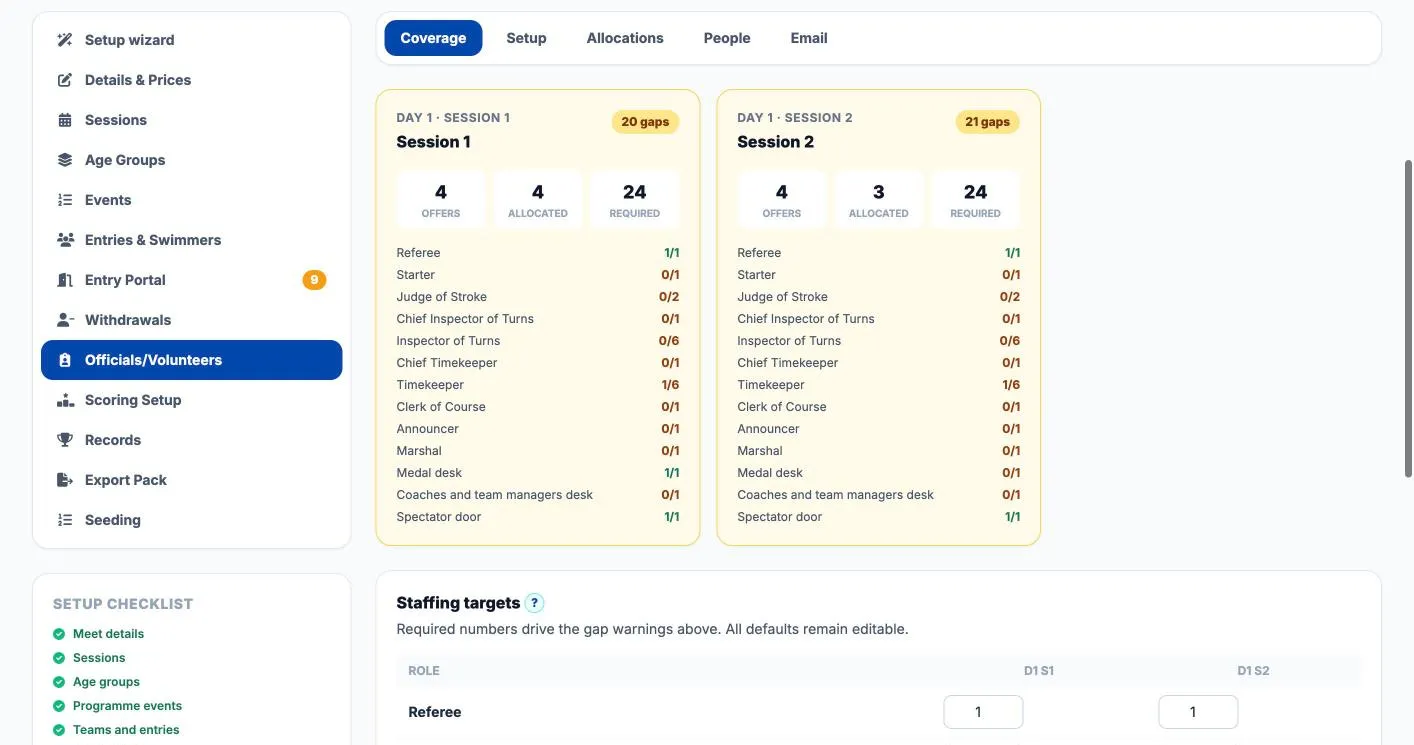
Officials and helpers sign up on the same link, are placed in the role they asked for, and the coverage board shows the gaps session by session.
In our end-to-end test meet (six clubs and 164 entries, by file, by hand, from SwimClubOS and late), SwimMeetOS sent more than 40 emails without the host typing one.
Share a single link, or a short name such as /s/your-meet-2027. It is the meet pack, the entry form, the late entry desk, the withdrawals desk and the volunteer sign-up, all in one place. Clubs need no account.
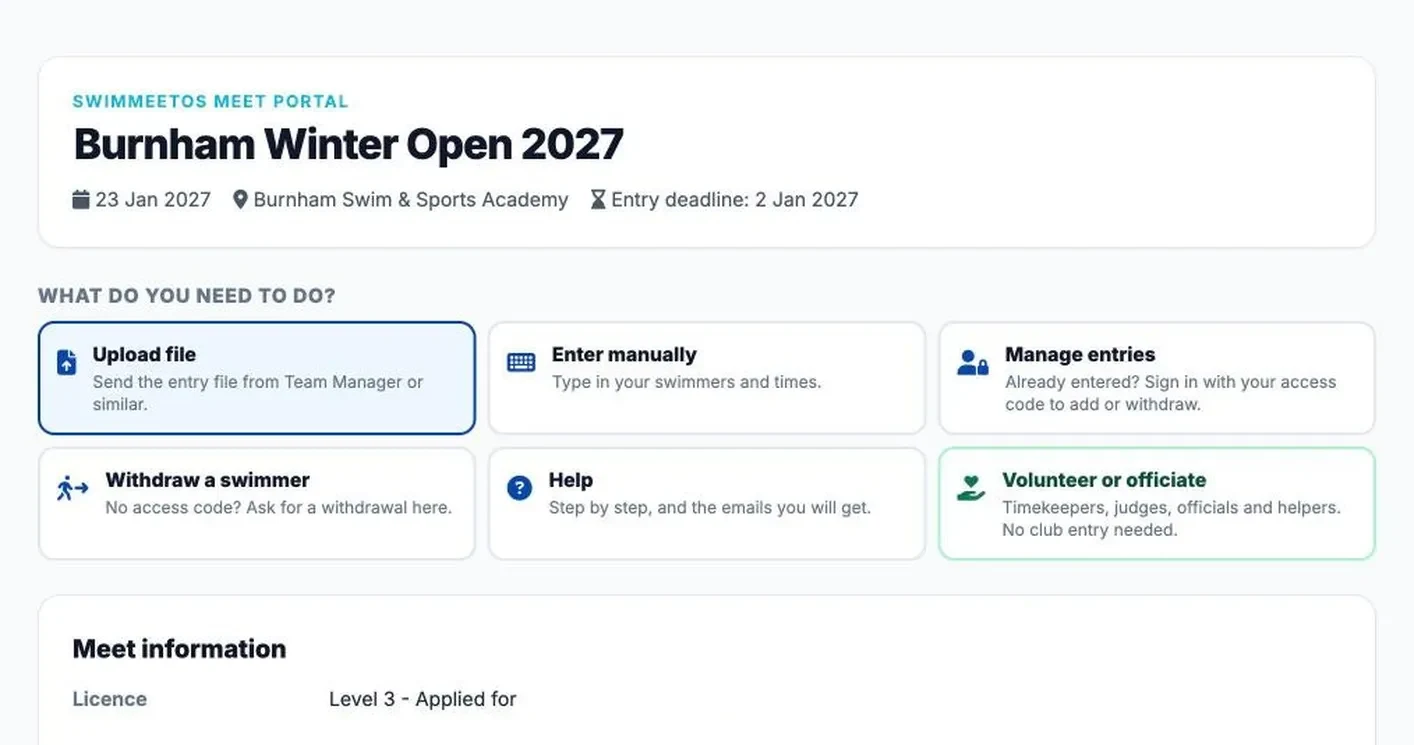
Upload the file from Team Manager or a similar system, type swimmers in, come back to manage entries, withdraw a swimmer, read the help or volunteer. The meet pack, conditions, payment details and warm-up rules sit underneath.
Need an invitation-only meet? Turn on an entry password. Clubs that use SwimClubOS connect with the meet entry code and send their entries straight from the club system.
Enter a date of birth and sex and the form shows only the events that swimmer can enter, with the session, start time and qualifying time beside each one. Long course times are converted before they are checked.
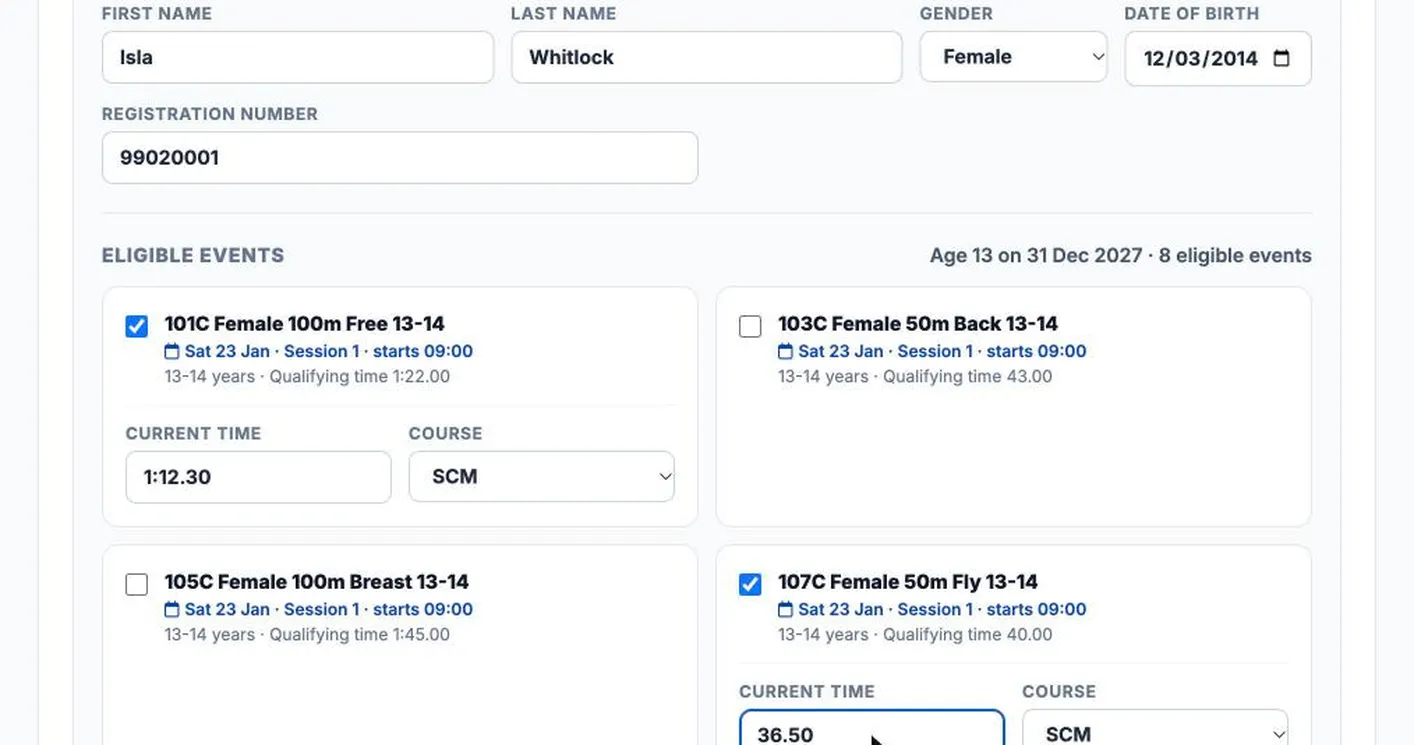
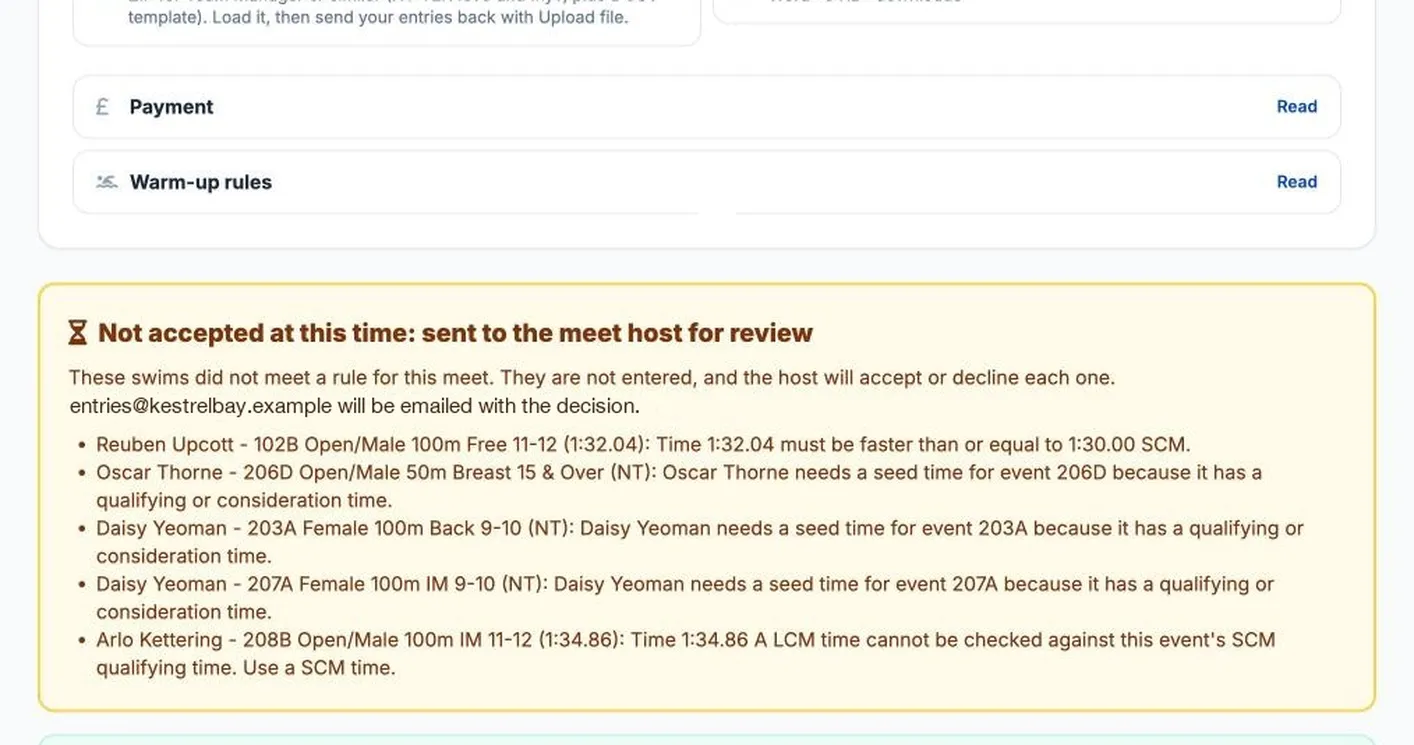
Swims that miss a qualifying time, have no entry time or go over the event limit are not silently dropped. The club is told which ones and why, and they wait for your decision.
Every held swim and late request lands in Entries in review. Tick the swims you will take, accept them as exhibition swims, use a waiting list or decline, and add a message. Each card shows how full the event and the session would be.
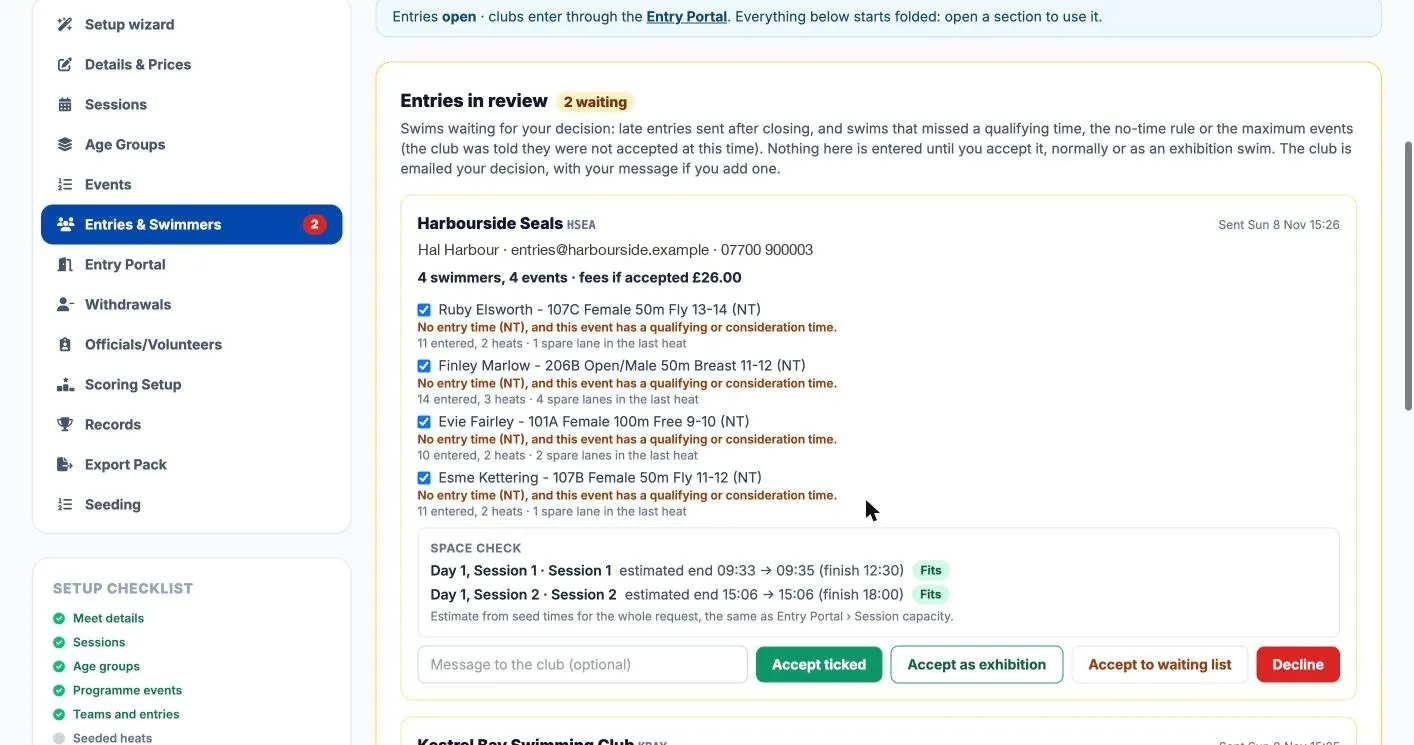
After closing, the link turns into a late entry desk. A request is never an entry until you accept it, and the club is emailed your decision.
Clubs withdraw with their access code; parents ask without one. Swimmers in a heat need your OK while a withdrawal window is open, so heat sheets never change behind your back.
A checklist shows what clubs will need before you open entries: fees, sessions, deadline, conditions, licence, payment details, declarations.
After entering, clubs add para classes and secondary strobe starts for the swimmers who need them. The host and referee see them.
Fees, the club admin fee, kept fees for late withdrawals and charges add up per club. Send each club its entries confirmed email with the amount to pay, then mark it paid.
Running Meet Manager as well? Every withdrawal, addition and scratch from clubs is listed for you to mirror, and the HY-TEK event pack is in the meet pack for clubs.

See requests waiting for you, who asked and why, whether the fee is kept, and a CSV of changes for Meet Manager. Open withdrawals for 15, 30 or 60 minutes between sessions with one click.
The club secretaries entering your meet are volunteers as well. SwimMeetOS gives them a clear page, plain emails and fewer reasons to phone you.
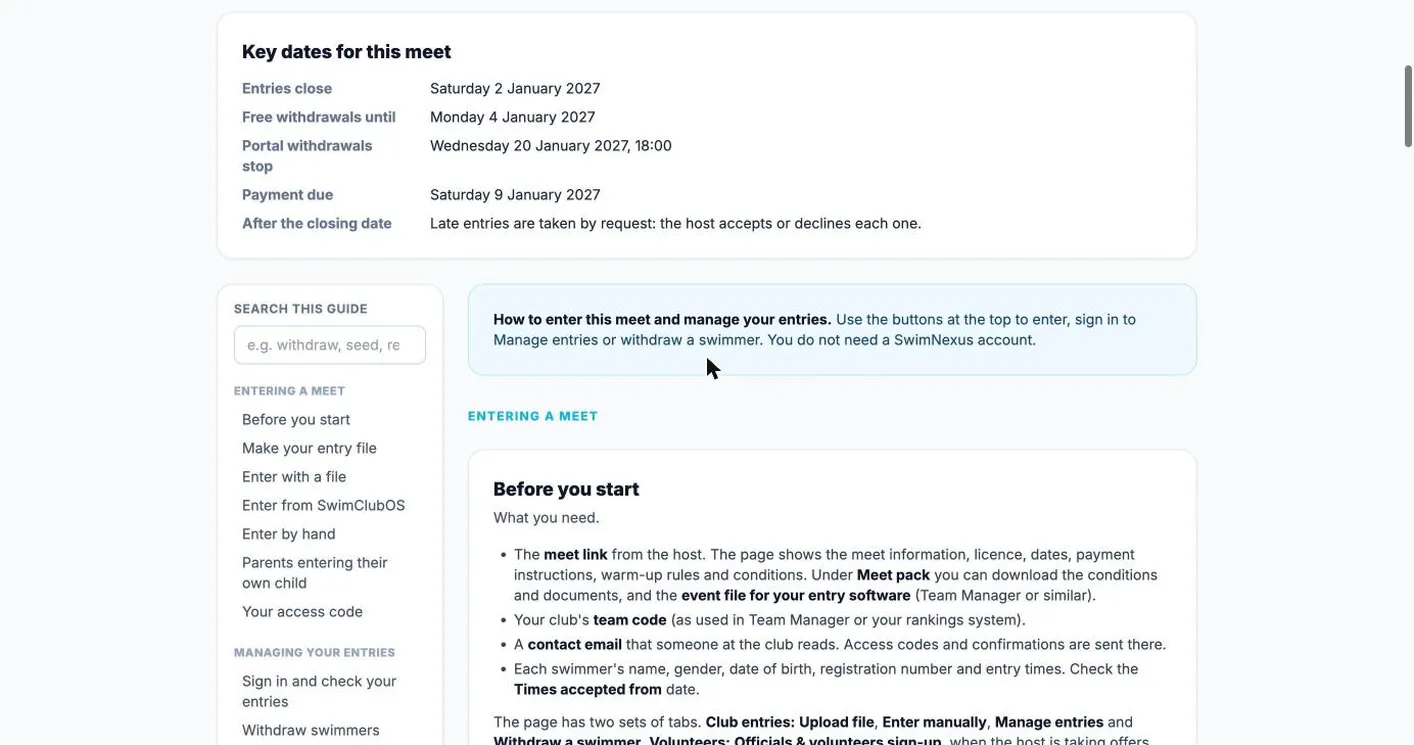
A Help tab shows the key dates (entries close, free withdrawals until, portal withdrawals stop, payment due, what happens after closing) and a searchable guide: making the entry file, entering by hand, parents entering their own child, the emails they will get and common problems.
Clubs enter with the file their Team Manager or similar system already makes, or type entries in. The meet pack includes the event file to load first.
Straight after uploading, the club sees what was entered, what is waiting for the host and why, and gets a list of anything not entered to fix and resend.
The contact gets an access code by email. With it the club adds swimmers, changes times and withdraws, without phoning the host.
For open meets, a parent can enter a swimmer whose club is not entering, or ask to be added to the club’s entry. The host decides.
Each club gives a treasurer email. Fees, the confirmation with the amount to pay and payment details go there too.
Clubs add S, SB and SM classes and secondary strobe starts after entering, so the host and referee know before the day.
Clubs on SwimClubOS connect with the meet entry code, choose swimmers in their own system and send entries straight to you. If the host refuses a swimmer, the club sees which one and why.
After the meet, clubs get results files for Team Manager or their club system, and parents follow the meet live for free.
Officials and general volunteers sign up on the same meet link as the entries. There is no separate sign-up service to pay for, and nothing for helpers to register with.
Each person gets a provisional place in the role they asked for, the coordinator is emailed, and the coverage board shows every role and session, with the gaps counted. Publish a Still needed list, send reminders, print the rota and handle mileage claims in the same place.
Standard roles cover the technical officials (referee, starter, judges, inspectors of turns, timekeepers) and the general helpers: marshal, medal desk, coach and team manager desk, and spectator door.
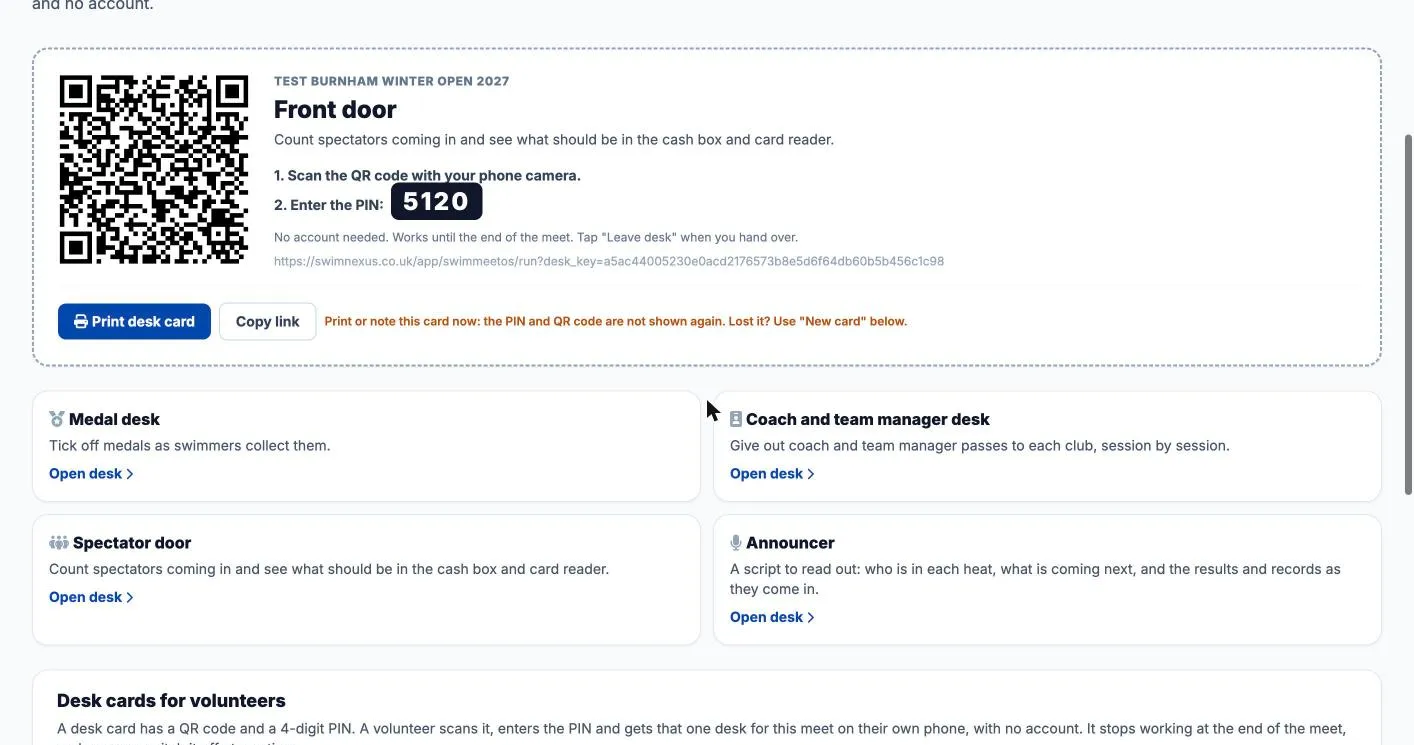
Print a desk card for each job. A volunteer scans it, types the PIN and gets that one desk for that meet, with no account and access to nothing else. Cards stop working at the end of the meet, and you can switch one off at any time.
Tap Adult, Child or Under 5 as people come in, cash or card. The desk keeps the count for the session and shows what should be in the cash box and on the card reader. Taps made without signal are sent when it comes back.
Every medal winner, event by event, with a tick when the medal is collected. Search for a swimmer or club when a parent asks.
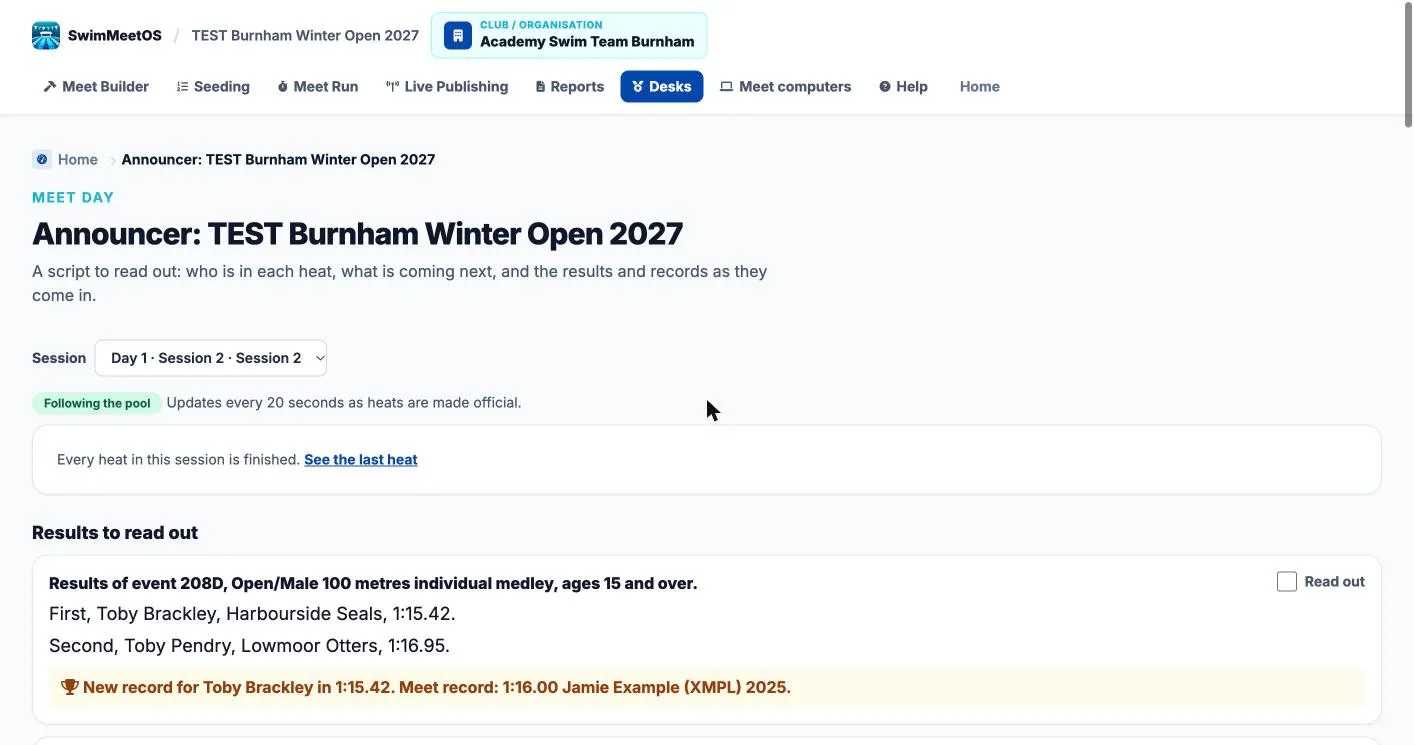
A script to read out: who is in each heat, what is coming next, and the results with any new records, as heats are made official.
Give out passes club by club, session by session, against each club’s allowance.
Nobody needs a login for a desk. Leave desk ends the session when a volunteer hands over.
See which cards have been opened, issue a new card if one is lost, and switch any card off.


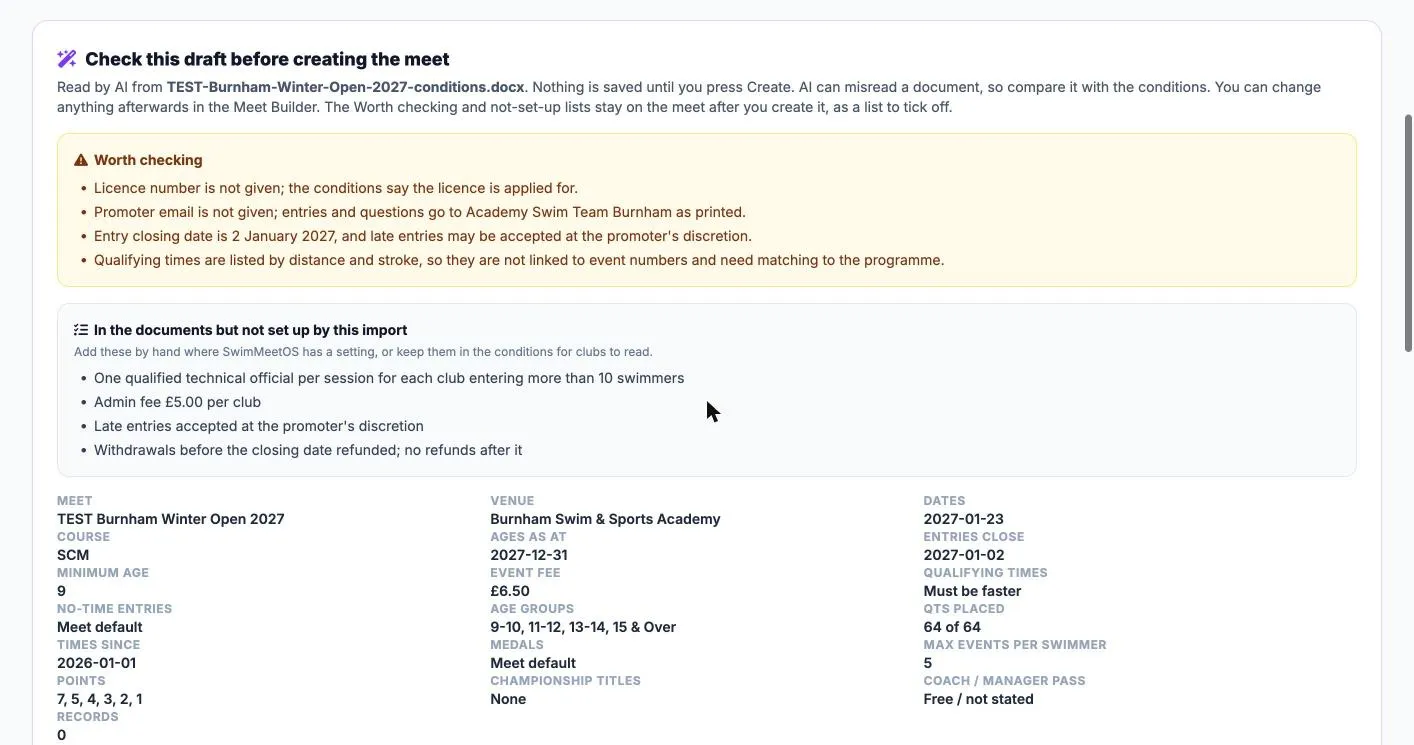
Upload the conditions as a PDF or Word file. AI reads the dates, sessions, events, age groups, fees, qualifying and consideration times, records and the club admin fee into a draft you check before anything is saved.
Anything it was unsure of, or that SwimMeetOS has no setting for, becomes a checklist on the meet for you to tick off. Then a six-step setup wizard covers the rest.
AI can misread a document, so compare the draft with your conditions. You can also import a Meet Manager programme or reuse one of your own meets.
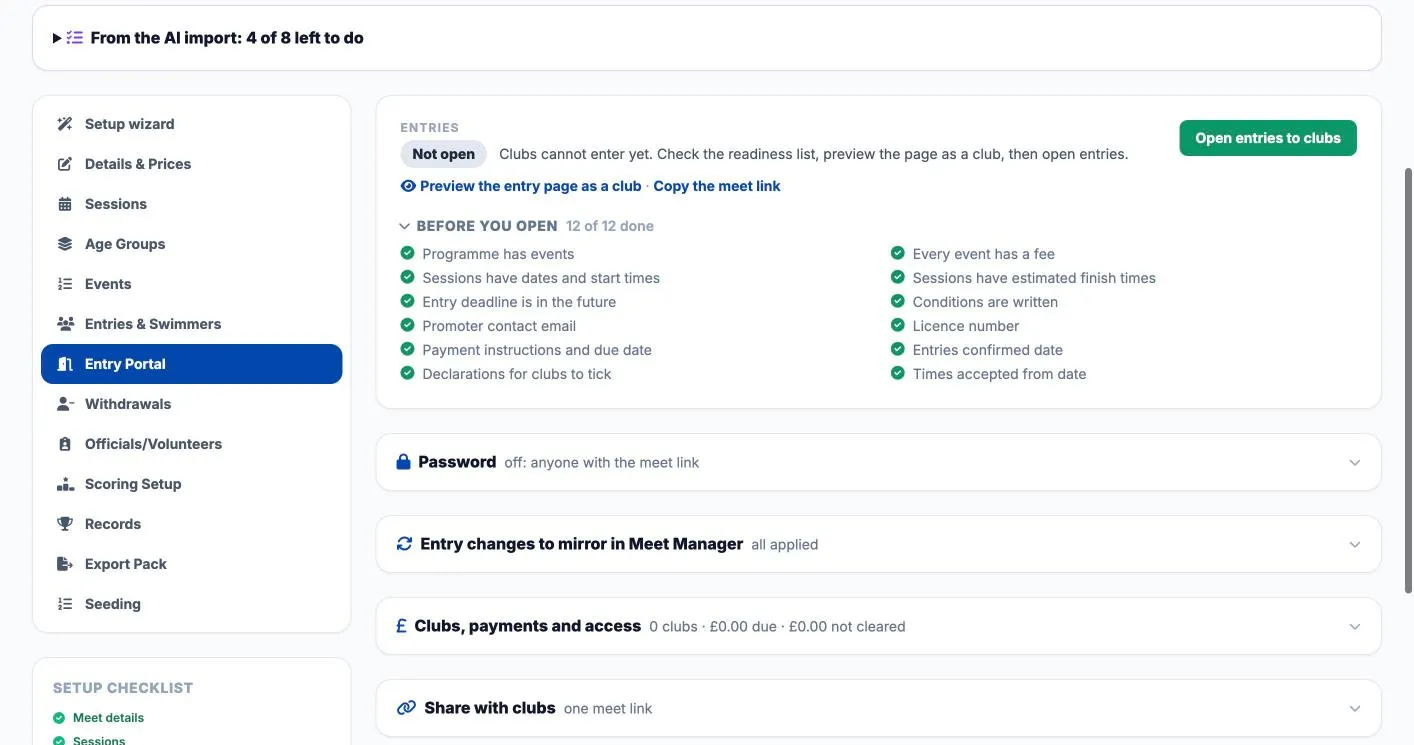
Preview the entry page as a club, then open entries when the checklist is green. Seeding can spearhead every heat or circle-seed the fastest heats, as county conditions ask; mixed age groups swim together and medals stay by age group.
See the import and rehearsal checklist →Qualifying times can be in a different course from the pool. Entry times are converted with Swim England factors or the Meet Manager ×1.02 rule before they are checked.
Swims inside the consideration time wait for space, as county conditions ask, with the QT and CT shown side by side.
Finals fill from the heats as they are made official, with reserves in order. Finalise when ready; a scratch promotes the next reserve.
Age-group finals, or Junior and Senior finals across the age groups, plus champion titles per meet with your own names and ages.
S, SB and SM classes, Multi-Class results ranked by para points, para medals and points, and strobe starts on the referee’s sheets.
Give an event its own age groups (for example 11-12, 13, 18+), and run mixed girls’ and boys’ age groups under one event number.
Upload the conditions as PDF or Word and add your meet logo. Clubs download them with the event file from the meet link.
Choose who replies go to for each meet. Meet emails carry the SwimMeetOS masthead and your meet logo.
Set a maximum per event. Over-cap events are flagged with every entry listed, and you choose who swims.
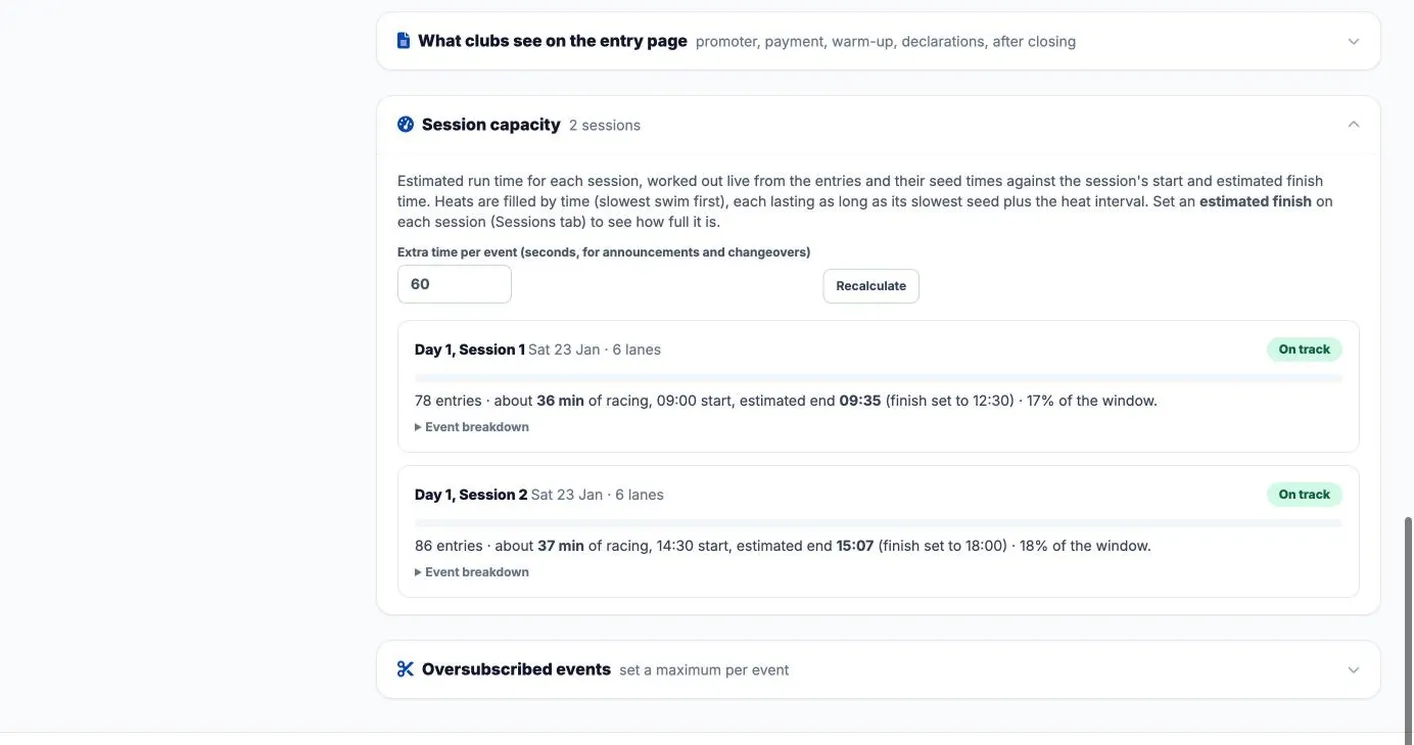
Session capacity works out the racing time from the entries and seed times as they arrive, against each session’s start and planned finish. The same space check sits on every late request, and the session timeline report projects heats before you seed.
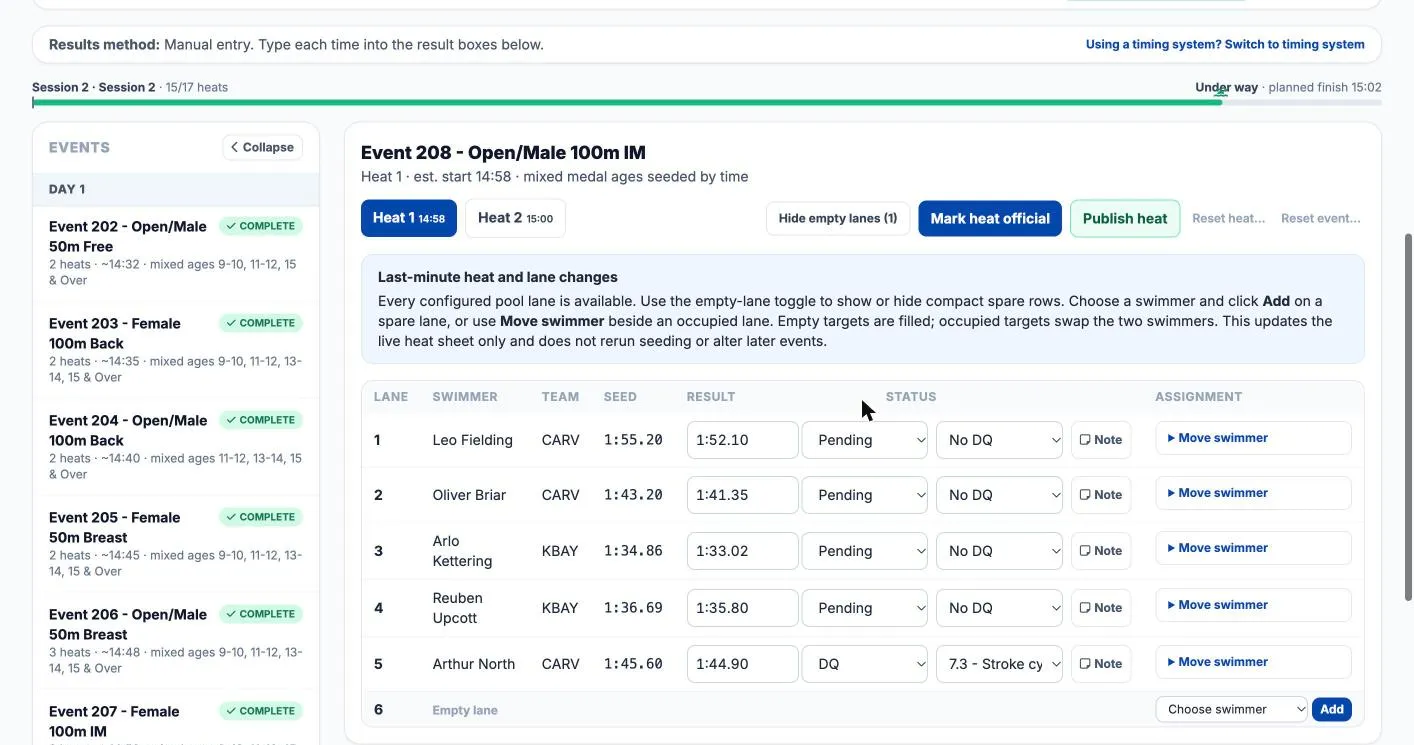
Type times or let them arrive from the timing system, set DQs with the stroke rule, and mark each heat official. Lane changes update the live heat sheet without reseeding later events. A swim that beats a record is flagged for you to confirm.
Meet Run shows connection and queue status. Prepare offline while online, rehearse a lost-connection recovery and keep the emergency export available.
Offline changes need successful synchronisation before public results update. Timing hardware and the venue workflow must be checked separately.
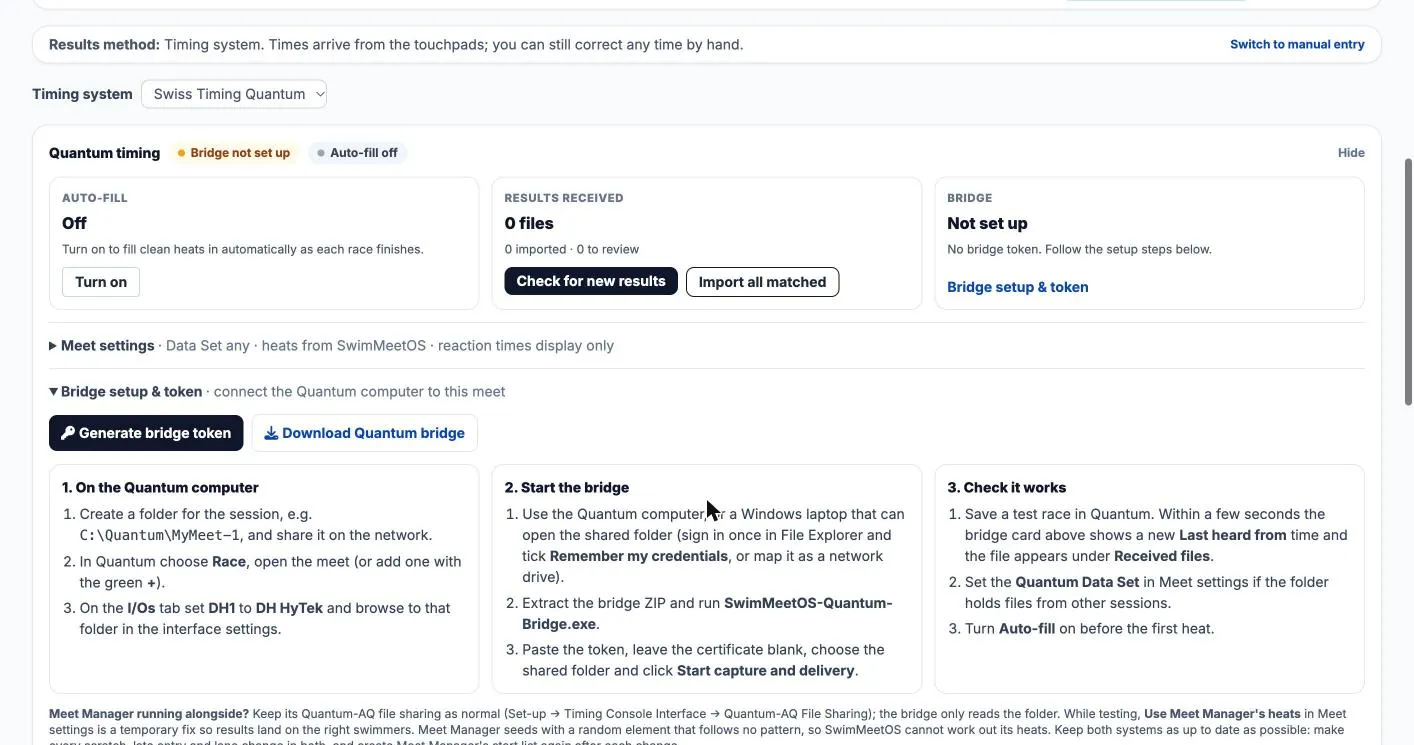
The bridge app watches the Quantum result folder and sends each race in. Turn on Auto-fill and clean heats fill themselves; anything odd waits for you. Rehearse at your venue first.
See the touchpad and backup times side by side, and use the backup time with one click when the referee agrees.
Quantum splits show on each lane and can go on the live page. Reaction times are marked display only until the blocks are calibrated.
Missed touches, missing backup times and swimmers who did not finish are counted per heat, and a lane with no finish is marked for the referee to check.
A progress bar shows heats done against the plan, and whether the session is ahead or behind.
Move swimmers between lanes, add a swimmer to a spare lane, and open withdrawals between sessions without reseeding later events.
An ALGE SwimTime connector is also available. It is newer than the Quantum route and has not yet been used at a meet, so rehearse it with us first.
Publish your meet and parents can follow it in the phone's browser. No app, no login and no charge per viewer, on every licence. Designed for the phone in your hand, because that is where most people will watch.
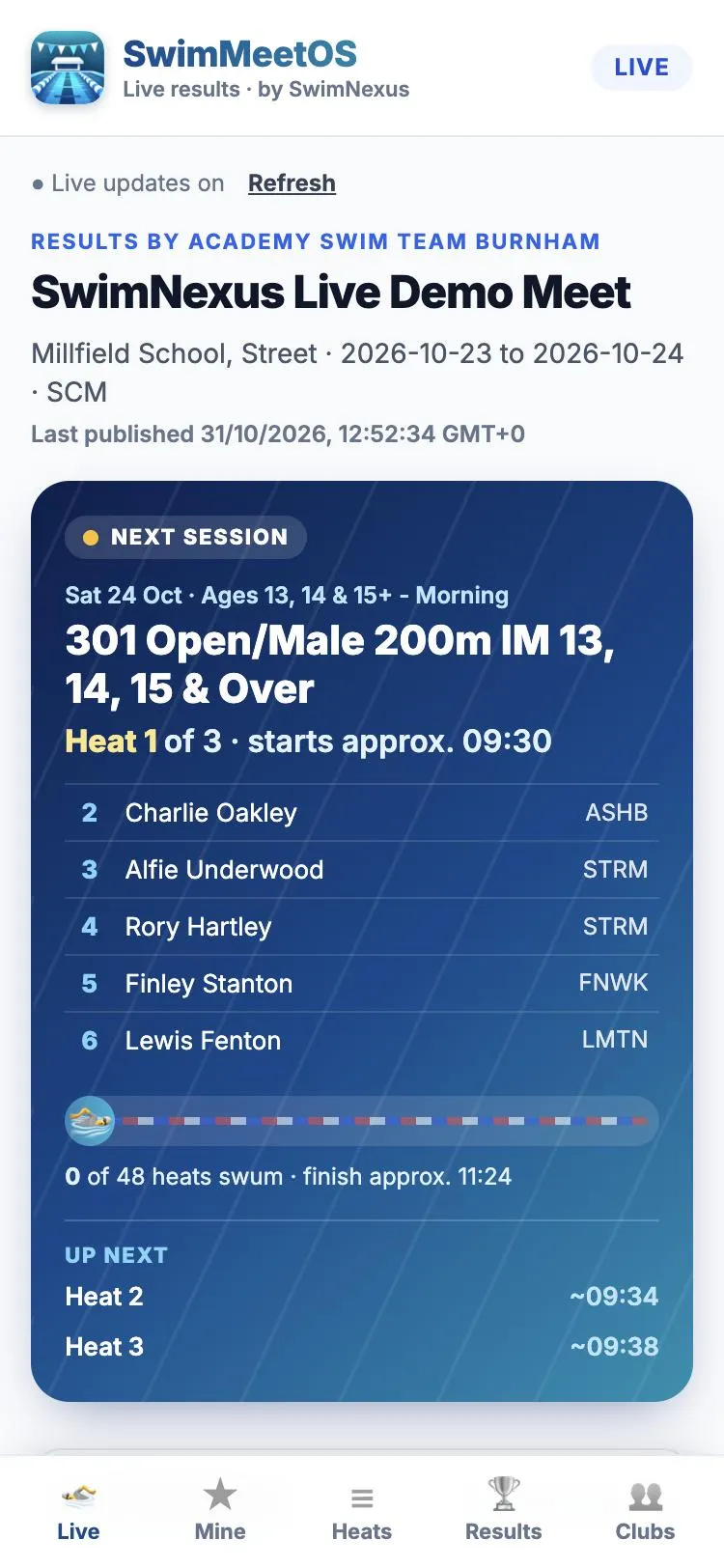
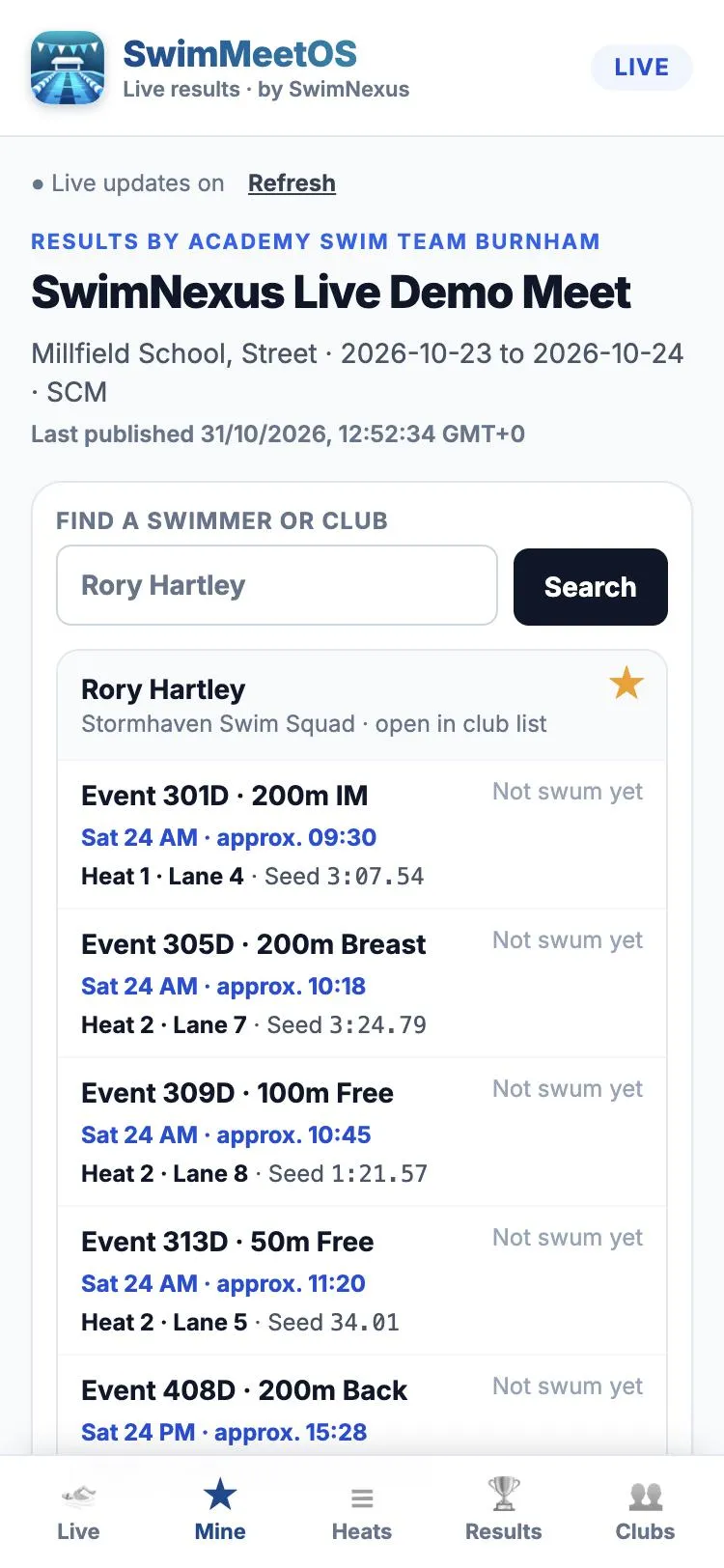
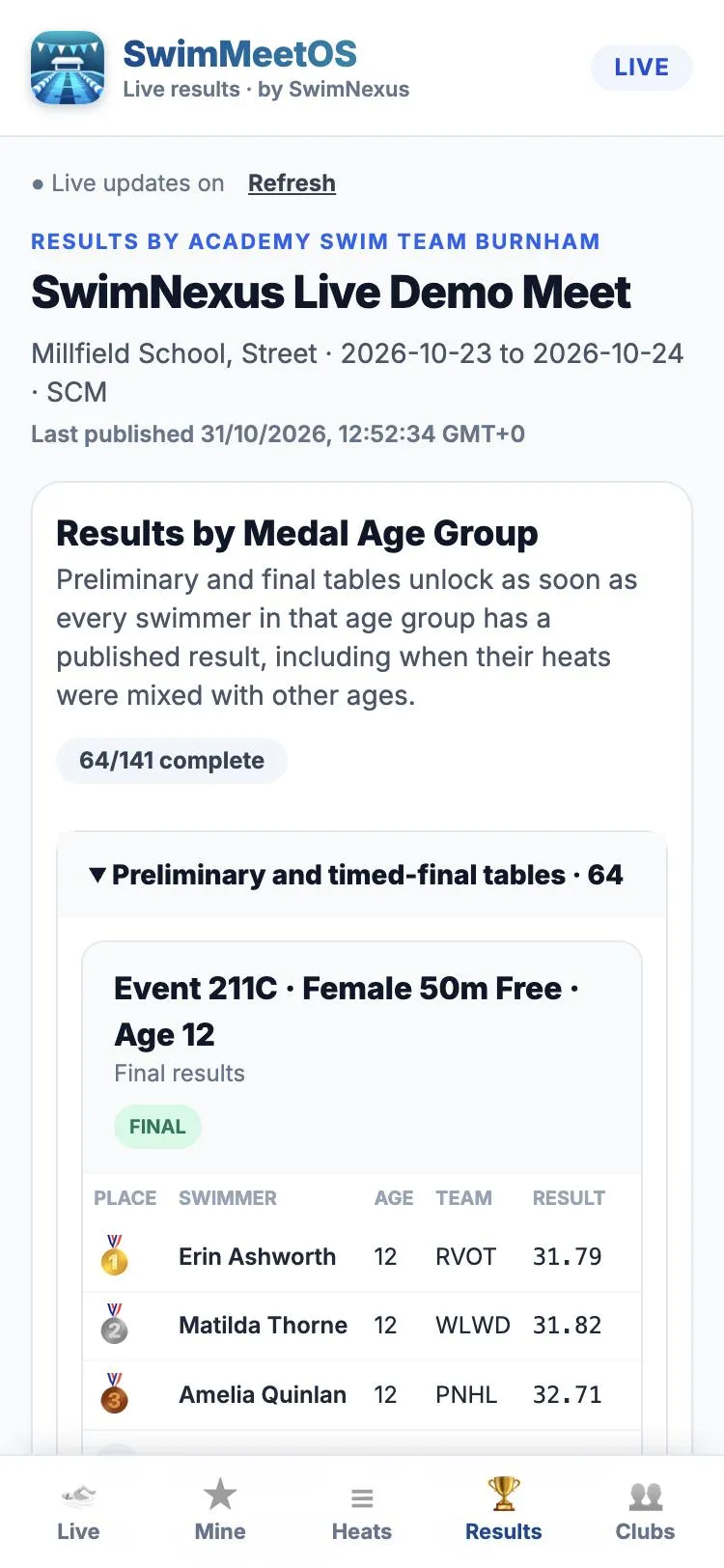
Parents star a swimmer and see their next race and roughly when it should start.
See the current heat lane by lane, and what has just finished.
Heat results, splits, places, and age-group tables with medals.
Find any swimmer or club in the meet.
Results go public when you publish them. You choose whether to show heat sheets, psych sheets and team scores.
Used at a multi-session county-level meet. Pages update about once a minute.
The live page shows the heat in the water, who is next and roughly when the session will finish, on a phone, laptop or tablet.
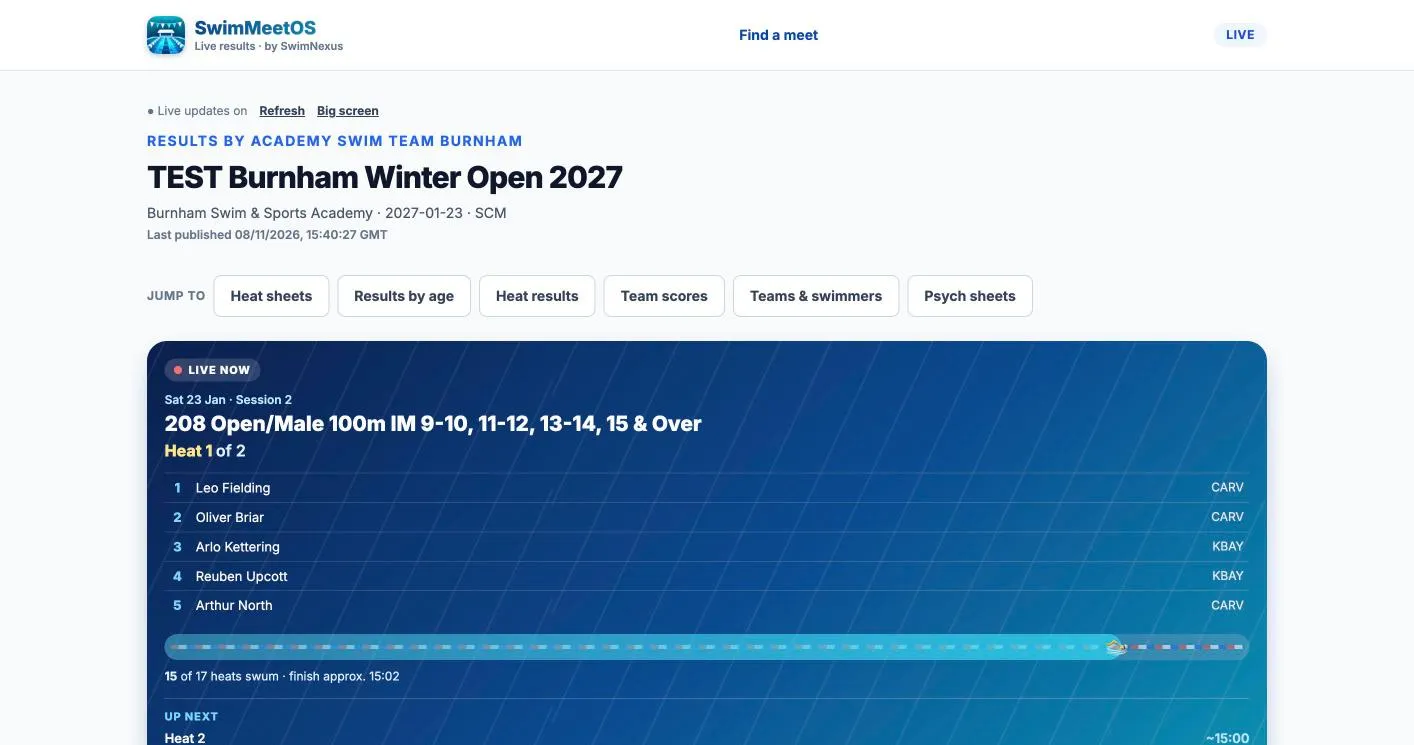
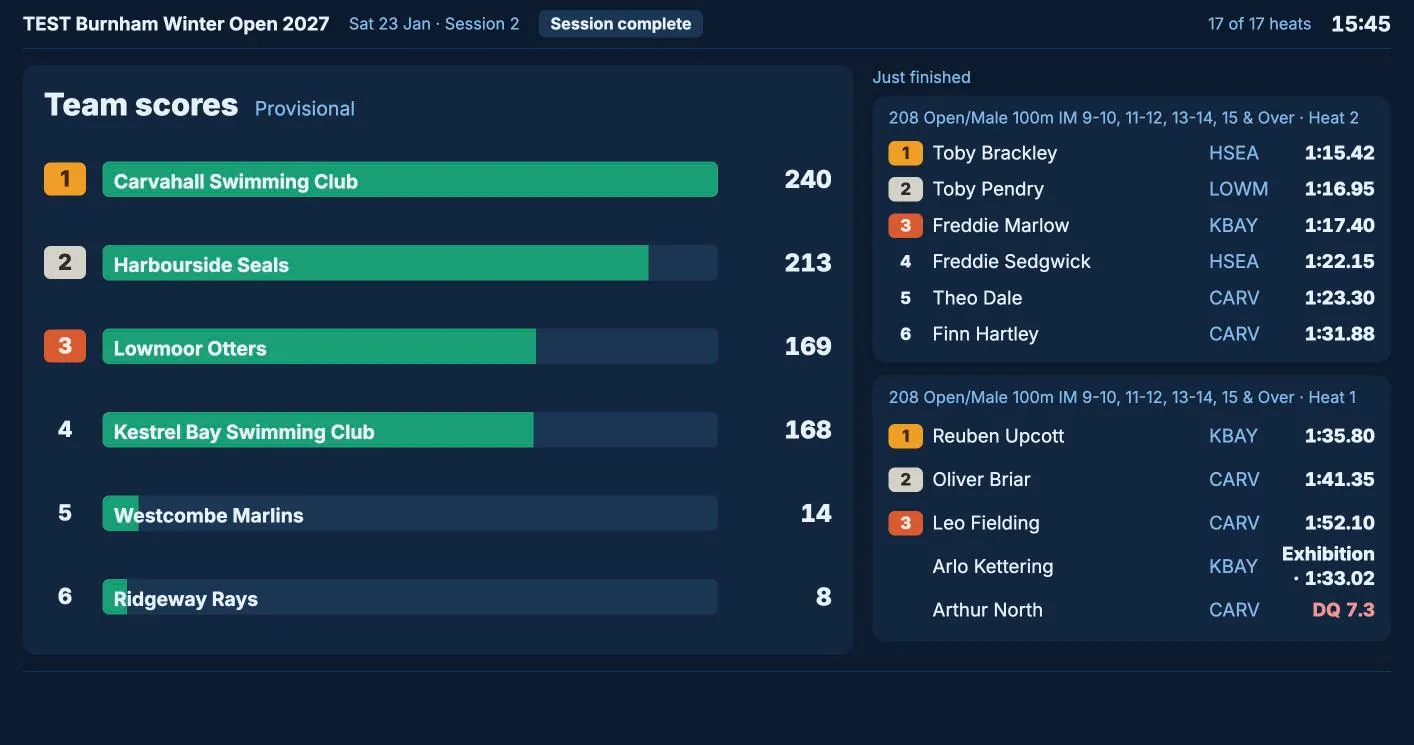
Add ?screen=big to the live link for a TV in the venue or the café: the heat in the water, results as they land, medal podiums and team scores.
Parents can install the SwimMeetOS app on Android or iPhone and see listed meets with no login. Listing your meet is your choice.
Starred swimmers show their next race with an estimated time that moves with the pool, ahead or behind.
New records are flagged on results, and a DQ shows its rule, not just a code.
The meet day plan lays out every pack and report: before the meet, session by session and after it. Results go to clubs as HY3, SD3 or CL2 in one ZIP, and to Swim England rankings as LENEX or CSV.
Records broken are listed for you to confirm, award desk sheets and team scores print in one click, and the finance report shows who has paid.
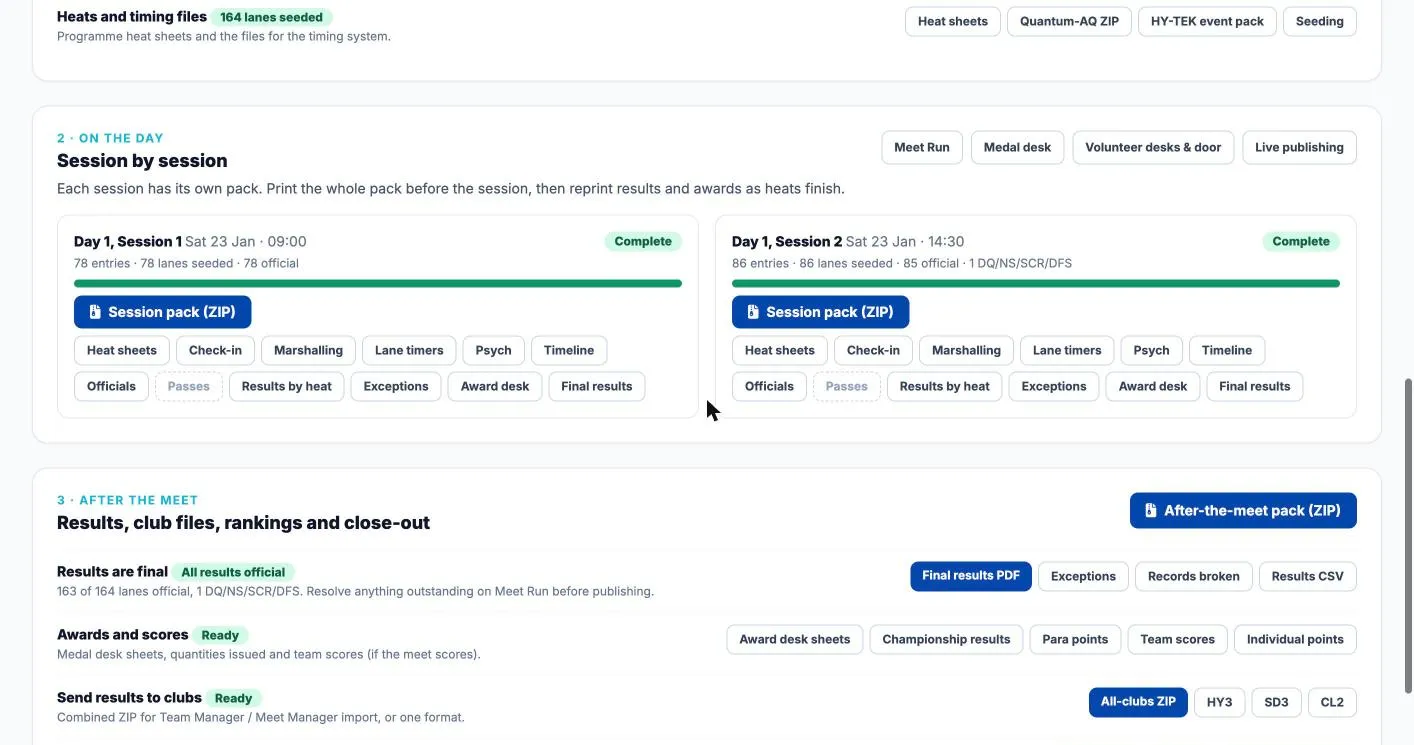
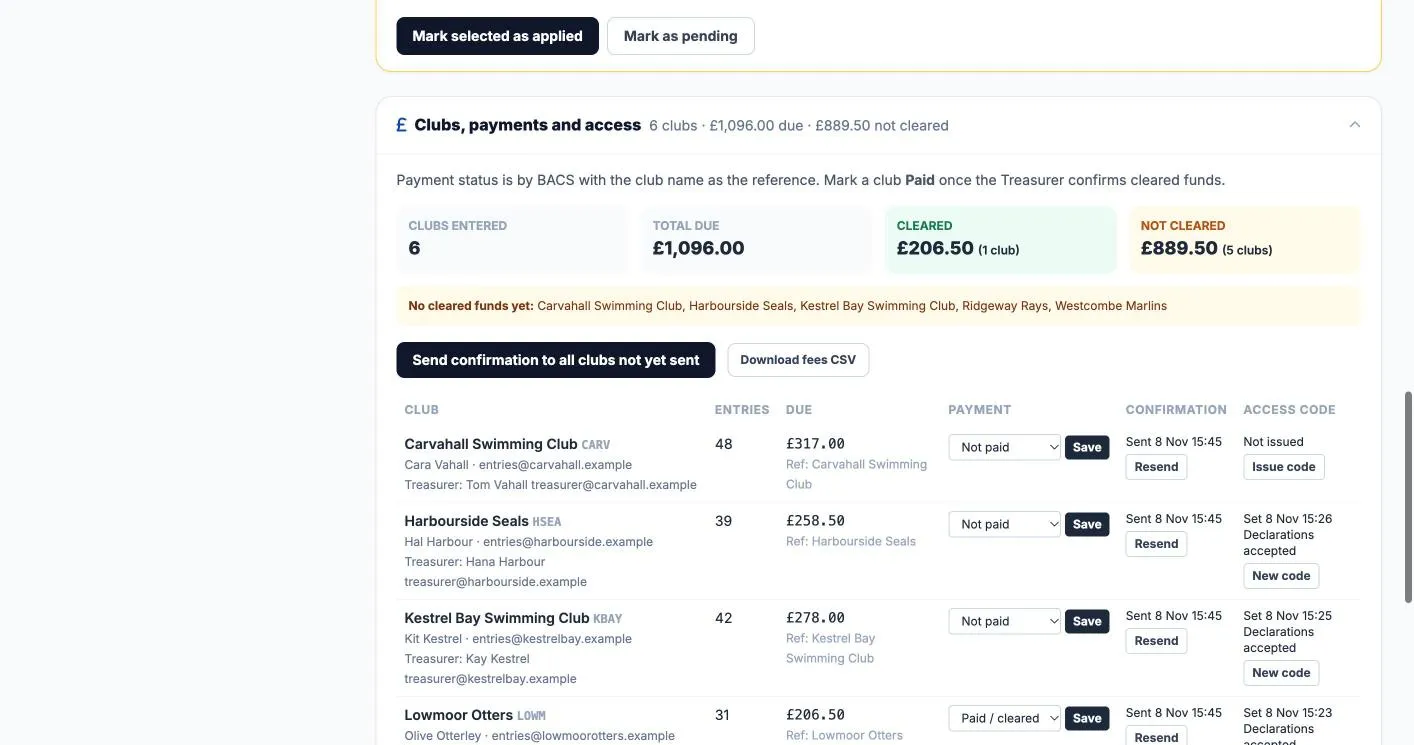
Each club’s fees and admin fee are added up for you. Send the entries confirmed email with the amount, mark clubs paid as funds clear, and see at a glance who still owes.
Confirm a broken record and the meet’s records list updates. Download the records as a PDF for your website, or as a CSV to load into next year’s meet.
Heat sheets, check-in, marshalling, lane timers, psych sheets, officials, passes, results and award desk sheets for each session, in one ZIP.
Championship titles, Multi-Class para results and team scores print in one click.
Late withdrawals keep their fee where your conditions say so, and late additions and passes are added to each club’s total.
Copy this year’s setup, programme, QTs and records into next year’s meet, then change the dates.
Rehearse on a practice meet, then delete it with the meet name typed to confirm. Meets with recorded club payments are protected.
Many of these came straight from hosts running real meets.
Give each club a code. They manage entries, withdrawals and late requests with no account to set up, and you approve changes.
Heats fill your finals, with reserves ready if someone scratches.
Times arrive from Quantum without retyping. Rehearse at your venue first.
Medal desk, coach and team manager passes, a spectator door counter and an announcer script. A volunteer scans a desk card and enters a PIN: no account, and access to nothing else.
Convert qualifying times with Swim England factors or the Meet Manager ×1.02 rule.
Turn a held swim or a hand entry into an exhibition swim with one button.
Swims inside the consideration time wait for space, as county conditions ask.
A swim that beats a record is flagged; confirm it and the records list and PDF update.
Set who replies go to for each meet, and upload your conditions as a PDF or Word file.
No. You share one meet link. Clubs upload the entry file from Team Manager or a similar system, or type their swimmers in, and get an access code by email so they can come back to add, change or withdraw swimmers. Clubs that use SwimClubOS can send their entries straight from it with the meet entry code instead.
It is held for you, not thrown away. The club is told which swims were not accepted and why, and you accept each one, accept it as an exhibition swim, put it on a waiting list or decline it. A space check shows how each decision changes the session finish time.
No. Officials and volunteer sign-up, the coverage board, allocation, reminders and the volunteer desks are part of SwimMeetOS. Helpers sign up on the same meet link, with no separate service to subscribe to and no account to create.
A phone. Print a desk card for the medal table, the coach and team manager desk, the spectator door or the announcer. The volunteer scans the QR code, types the 4-digit PIN and gets that one desk for that meet only. The card stops working at the end of the meet, and you can switch it off at any time.
Start by rehearsing a meet you already know. Check programme setup, imported entries, seeding, relays, finals, scoring, timing and required exports. SwimMeetOS has been used at real meets, but every meet differs, so keep a fallback until you are confident. If you run Meet Manager alongside, SwimMeetOS lists every entry change from clubs so you can mirror it.
Yes, three ways. Upload the conditions (PDF or Word) and AI reads the dates, sessions, events, age groups, fees and qualifying times into a draft you check before anything is saved. Or import a Meet Events ZIP or EV3 file from Meet Manager, or reuse one of your own meets.
Meet Run supports prepared offline operation. Load the meet online and use Prepare offline before connectivity is lost. Changes queue locally and public results update after reconnection and successful synchronisation. A cold start without a prepared snapshot is not supported.
Quantum is the proven route so far: result files can fill in times automatically through the bridge app, and a timing pack exports start lists. ALGE SwimTime support is newer. For anything else, check the exact hardware, software version and output route with us. Always rehearse at the venue.
Results as HY3, SD3 and CL2 for Team Manager and Meet Manager, one ZIP for every club, LENEX, and a Swim England rankings CSV. PDFs cover final results, award desk sheets, team scores, records broken and finance.
Meet-day support is not included, so rehearse first and keep a fallback. Meet Run keeps working through a lost connection when the operator has prepared it for offline use.
Rehearse your previous programme, entry files and a sample race-day session. We can identify what fits, what needs checking and what must be ready before replacing your current meet system.